Sounds
You can preview sound files, such as .wav and .ogg, with Rick:
Note
The editor does not support XACT audio banks from the Xbox 360 version of the game.
Playback
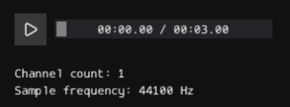
The previewer shows a compact audio player:
- Play / Pause: Starts or pauses playback.
- Timeline Slider: Shows playback progress and allows seeking.
- Current Time / Duration: Displays the current playback time and total sound length.
Dragging the timeline slider seeks to a new position in the sound.
Sound Information
The previewer also displays basic audio metadata:
- Channel count: Number of audio channels.
- Sample frequency: Playback sample rate in Hz.
Editing Audio
You can't edit or save audio files with the previewer.
Use an external audio editor to modify the source sound.